przio.com

Free Web Hosting — Drag a .zip, Point Your Domain, Ship.

Production hosting for static sites and self-hosted WordPress — with versioned deploys, instant rollback, custom domains and HTTPS, sandboxed PHP, and the PRZIO SDK auto-injected on every page.

Static · drag-drop ZIP WordPress · SQLite, 1-click HTTPS · upload your cert
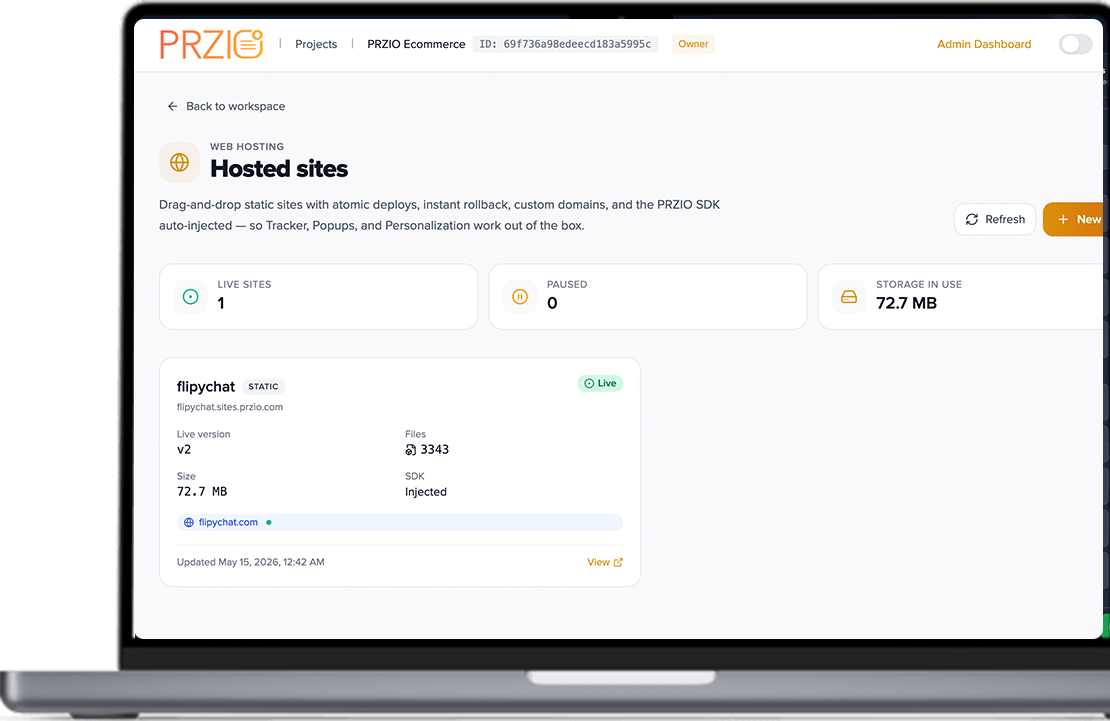
PRZIO Hosting dashboard showing hosted sites with live status, storage, and site cards
< 60sZip to live URL
1-clickPromote / rollback
200 MBBundle limit
Auto SDKTracker, Popups, AI
Why teams pick it

Hosting that doesn’t make you a sysadmin

Three things hurt most teams: deploys that aren’t safe, domains that don’t work, and analytics that need a separate setup. We fixed all three.

Drag and drop a .zip to deploy a new version

Atomic, versioned deploys

Drag a .zip. We extract it, scan it, freeze it as v3, and serve it. Every previous version stays around — rollback is one click.

Create a new site: Static or WordPress

WordPress without the MySQL

Pick WordPress, upload the ZIP, click Install SQLite. No database server, no wp-config.php editing.

Built-in integrations: Tracker, Popups, Personalization, Audience, Chatbot

The whole PRZIO stack, free

Every page gets the PRZIO SDK injected at the edge — Tracker, Popups, Personalization, Audience, and Chatbot on day one.

Capabilities

Everything you need in one hosting product

Static sites, WordPress, domains, HTTPS, and the full PRZIO marketing stack — without stitching vendors together.

Static

Drag-drop ZIP deploys

Upload a bundle up to 200 MB. Immutable versions, optional auto-promote, and SPA fallback for React, Vue, or Next.js exports.

WordPress

SQLite in one click

Self-hosted WordPress with sandboxed PHP and no MySQL. Themes and plugins still install from wp-admin.

Domains

Custom domain + HTTPS

TXT and CNAME records with a Verify button. Upload your certificate and key — www and apex aliases supported.

Safety

Instant rollback

Every deploy is a save point. Promote any archived version in one click — visitors never see a half-deployed site.

PHP

Per-site sandbox

open_basedir locked to your bundle, dangerous functions disabled, configurable memory and timeouts.

SDK

Auto-injected PRZIO SDK

Toggle Tracker, Popups, Personalization, Audience, and Chatbot without editing HTML — even on third-party themes.

Workflow

From a folder on your laptop to a live URL

Pick a site type, upload a bundle, point a domain. The dashboard does the boring parts.

Step 1 · Create

Pick a site type and you’re halfway done

Static sites get a clean ZIP host with edge SDK injection. WordPress sites get sandboxed PHP with one-click SQLite.

  • Slug becomes your-site.sites.przio.com for instant previews
  • Auto-inject SDK and SPA fallback are toggles in settings
  • PHP locked with open_basedir and hard per-request timeouts
Create site toggles for SDK injection and SPA fallback
Step 2 · Deploy

Drag a ZIP. Watch it go live.

We extract safely, scan paths, build an immutable version, and optionally auto-promote. Browse or edit files in the built-in file manager.

  • Up to 200 MB per bundle, 5,000 files
  • Deploy messages so versions read like release notes
  • Recent deploys list with promote and delete actions
Recent deploys list with version history
Step 3 · Domain

Custom domain in 60 seconds

Add your domain, copy TXT and CNAME records, click Verify DNS, then upload certificate and key.

  • Verified badge in the dashboard when DNS is correct
  • Tips for registrars that mangle apex CNAMEs
  • Alias domains reuse the verified primary
DNS records to add with TXT and CNAME and registrar tips
Step 4 · Roll back

Every deploy is a save point

Bad campaign asset? One Promote click on yesterday’s version. Pause a site for maintenance without losing versions.

  • Atomic promotion — no half-deployed visitors
  • Archived versions stay queryable
  • Clean 503 while paused
Deploys list with Promote and rollback
Built-in tools

Everything you’d normally bolt on, already inside

A web file manager, sandboxed PHP runtime, and one-click HTTPS — stop stitching three vendors together.

Web-based file manager

A real file manager in the browser

Browse, rename, edit, delete, upload — no SFTP. Edits create a new immutable version automatically.

Per-site PHP runtime limits

Per-site PHP sandbox

Memory, execution time, POST size, and file uploads — tuned per site.

HTTPS certificate upload

Bring your own HTTPS

Upload .crt + .key + optional CA bundle for every alias domain.

Inject PRZIO SDK toggle

SDK toggle, not snippet hunt

Flip Inject PRZIO SDK on and the full marketing stack starts working.

Vs other hosts

The boring stuff that quietly costs you a weekend

Honest comparison vs the most common alternatives marketing teams reach for.

Capability
PRZIO Hosting
Static-only host
cPanel / shared
Drag-drop ZIP, no CLI
Yes
Yes
No
Versioned deploys + rollback
Yes — immutable
Sometimes
No
WordPress with one-click SQLite
Yes
No
MySQL only
Built-in analytics, popups, AI chatbot
Yes — auto-injected
No
No
Install in 60 seconds

From zero to a real URL, before your coffee’s cold

No build pipelines required. The deploy is the upload.

# 1. Open PRZIO → your project → Hosting → New site site_type: static # or "wordpress" name: "Q4 launch" slug: q4-launch # → q4-launch.sites.przio.com inject_sdk: true # 2. Drag a .zip into the deploy area → v1 live # 3. (Optional) Add domain → Verify DNS → upload .crt + .key

WordPress? Pick the WordPress site type, upload wordpress.zip, click Install SQLite.

Pricing

One flat plan. No bandwidth fines.

Host every campaign microsite and WordPress install under one project.

Hosting

Bundled with every PRZIO project

$0/site to start

Free tier on every paid PRZIO project. Scale when bundle storage exceeds the included quota.

  • Unlimited static and WordPress sites per project
  • Versioned deploys with permanent rollback history
  • Custom domain + HTTPS + alias domains
  • Sandboxed PHP runtime with per-site limits
  • Auto SDK injection — Tracker, Popups, Personalization, Chatbot
Start hosting free
FAQ

Questions before you switch

Do I really not need MySQL for WordPress?

We ship the official SQLite integration pre-wired. Click Install SQLite after uploading WordPress — no wp-config.php editing.

What if I upload a broken deploy?

Deploys are immutable until you promote. Roll back by promoting the previous version in one click.

Can I run a React / Vue / Next.js export?

Yes. Toggle Single-page app fallback so 404 paths serve /index.html for client-side routers.

Do I have to use the PRZIO SDK?

No — auto-inject is a checkbox. Most teams leave it on for Tracker, Popups, and Personalization without HTML changes.

Stop renting three things you can have in one

Hosting, deploys, domain & HTTPS, file manager, sandboxed PHP, plus analytics, popups, personalization, and an AI chatbot — one dashboard, one bill.

Start hosting free

Copyright © 2026 PRZIO. All rights reserved.