Visitors leave websites for many reasons: unexpected costs, unanswered questions, distracting navigation, or simply because they are not ready to buy. An exit-intent popup gives you one final opportunity to provide value before a visitor closes the tab or navigates away.
When used thoughtfully, exit-intent campaigns can recover abandoned carts, grow email lists, promote relevant offers, and direct visitors toward useful content. This guide explains how to create an effective campaign with PRZIO Popup Campaigns, including practical examples, image guidance, targeting strategies, and common mistakes to avoid.
What Is an Exit-Intent Popup?
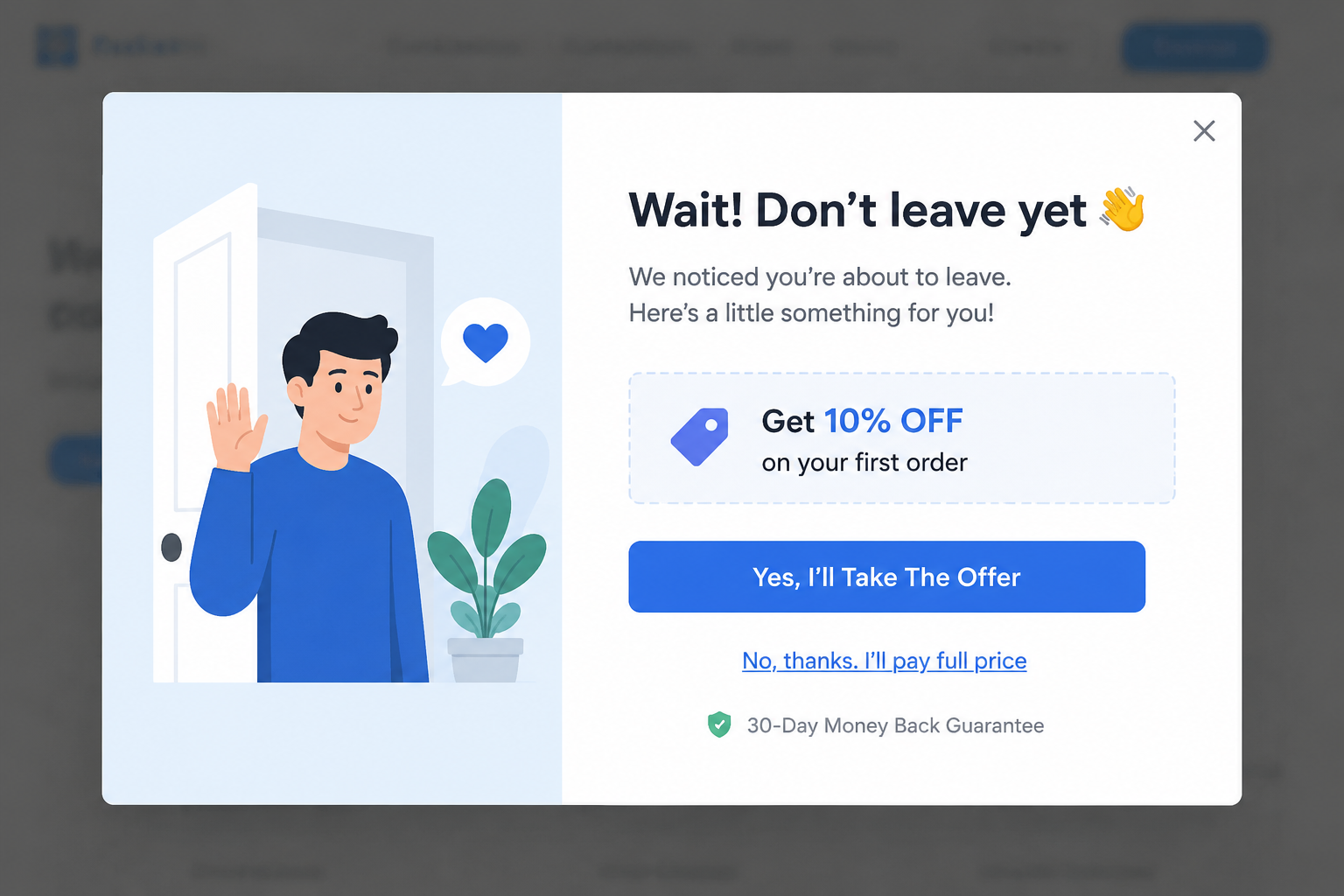
An exit-intent popup is an onsite overlay triggered when a visitor appears likely to leave a page. On desktop devices, this behavior may be detected when the pointer moves rapidly toward the browser controls. On mobile devices, exit signals can include scrolling upward, pressing the back button, remaining inactive, or reaching a defined engagement threshold.
The objective is not to prevent people from leaving at any cost. A good popup recognizes the visitor's context and presents a useful next step, such as saving a cart, receiving a first-order discount, asking a product question, or subscribing for future updates.
Benefits of Exit-Intent Popups
Recover potentially lost revenue
A shopper who has added products to the cart has already demonstrated purchase intent. A well-timed message can address the final objection with free shipping, a modest discount, delivery information, or reassurance about returns.
Build an owned audience
Not every visitor is ready to buy during the first session. An exit popup can invite these visitors to join an email list in exchange for a useful incentive. Captured contacts can be synchronized with PRZIO Audience Manager for segmentation and future campaigns.
Learn why visitors leave
A short exit survey can identify problems that ordinary traffic reports cannot explain. Asking one focused question, such as why a visitor did not complete checkout, can reveal concerns about price, shipping, product information, or website usability.
Promote more relevant actions
Exit intent does not always require a discount. You can recommend a buying guide, offer help, highlight a product comparison, or invite the visitor to view a more suitable category. This protects margins while improving the customer experience.
How to Create an Exit-Intent Popup
- Choose one measurable objective. Decide whether the campaign should capture email addresses, recover carts, collect feedback, or encourage product discovery. Avoid combining several competing actions in one popup.
- Select the right audience. Target visitors according to page, traffic source, device, location, session activity, or customer status. A first-time visitor should not necessarily see the same offer as a returning customer with items in the cart.
- Configure the exit trigger. Enable exit-intent behavior and consider supporting conditions such as minimum time on page, scroll depth, or cart value. These rules help prevent the popup from appearing before the visitor has had time to evaluate the page.
- Write a concise headline. Lead with the benefit. Headlines such as Save Your Cart for Later or Get 10 Percent Off Your First Order are clearer than vague messages asking visitors to wait.
- Add a short explanation. Use one or two sentences to clarify the offer, deadline, or next step. Keep the copy easy to scan and avoid unnecessary form fields.
- Create a specific call to action. Button labels such as Email My Discount, Save My Cart, or Show My Recommendations communicate more value than Submit.
- Set frequency rules. Limit how often each visitor sees the campaign. Suppress it after conversion, dismissal, or recent exposure so that it remains helpful instead of repetitive.
- Test and publish. Preview the popup on desktop and mobile, confirm that links and forms work, and verify that the close control is easy to use.
Adding Images in the Rich Text Editor
Images can make an exit popup more persuasive, especially when they reinforce the offer. In the PRZIO rich text editor, place the cursor where the visual should appear, choose the image option, select an uploaded asset, and configure its size and alignment. Preview the finished design at different screen widths before publishing.
Use a product image for a product-specific offer, a lifestyle image for an inspirational campaign, or a simple promotional graphic for a discount. Keep file sizes small to protect page speed, provide descriptive alternative text, and ensure the image does not push the headline or button below the visible area.
Maintain consistent colors, typography, and photography across campaigns by organizing approved creative files in PRZIO Assets Manager. The image should support the message rather than compete with it.
Exit-Intent Popup Use Cases and Examples
Cart abandonment recovery
A visitor moves toward leaving with products still in the cart. Display a message explaining that the cart can be saved, or offer free shipping when the order meets a defined threshold.
Still deciding? Complete your order today and receive free shipping on purchases over $75.
This campaign should appear only for visitors with cart contents and should be suppressed immediately after checkout.
First-purchase email capture
Show new visitors an incentive after they browse products but attempt to leave without purchasing. Ask only for an email address unless additional data is essential.
Take 10 percent off your first order. Enter your email and we will send your welcome code.
Send the contact into the appropriate audience segment and follow up with a relevant welcome campaign rather than unrelated promotions.
Product education
High-consideration purchases often require more information. On a product page, offer a size guide, comparison chart, setup checklist, or consultation instead of immediately reducing the price.
Not sure which option fits your needs? Read our two-minute comparison guide before you go.
Customer feedback
Use a one-question survey on pricing, checkout, or service pages to discover obstacles. Provide a few clear answer choices and an optional comment field.
What stopped you from completing your purchase today?
Review responses regularly and use repeated themes to improve product pages, policies, and checkout flows.
Content and lead generation
Service businesses can offer a checklist, guide, webinar, or assessment when a visitor exits an educational page. Match the resource closely to the page topic so the exchange feels useful rather than generic.
Best Practices for Better Results
Common Mistakes to Avoid
Showing the same popup on every page usually produces weak relevance. Excessive frequency can also frustrate returning visitors, while large images may slow the page or hide the main action on mobile devices. Other common problems include asking for too much information, using misleading countdowns, and offering a discount without checking whether it improves incremental revenue.
Start with a narrow audience and a clear hypothesis. For example, test whether free shipping recovers more high-value carts than a percentage discount. Evaluate both conversion and margin before expanding the campaign.
Frequently Asked Questions
Do exit-intent popups work on mobile?
Yes, but mobile exit behavior differs from pointer-based desktop behavior. Use signals such as upward scrolling, inactivity, back navigation, or engagement thresholds, and keep the layout compact.
How often should a popup appear?
A visitor should generally not see the same campaign repeatedly within a short period. Apply frequency limits and stop displaying it after conversion or dismissal.
Should every exit popup include a discount?
No. Helpful content, saved carts, product guidance, consultations, and feedback requests can generate value without reducing margins.
What should I test first?
Begin with the offer and audience because they usually have the greatest impact. Then test the headline, image, form length, trigger timing, and call-to-action text.
Create Your Exit-Intent Campaign with PRZIO
Want to integrate this into your storefront or website? PRZIO helps you ship hosting, personalization, campaigns, and recommendations from one platform. Use PRZIO Popup Campaigns to build targeted exit offers, add branded visuals, control frequency, and reach the right audience without assembling disconnected tools.
Ready to discuss your use case? Book a PRZIO demo and explore an exit-intent strategy designed around your customer journey.