Modern storefronts frequently update content without reloading the page. Product filters, shopping carts, recommendations, and single-page application routes can all modify the Document Object Model dynamically. JavaScript MutationObserver lets you detect these changes and respond efficiently.
What Is MutationObserver?
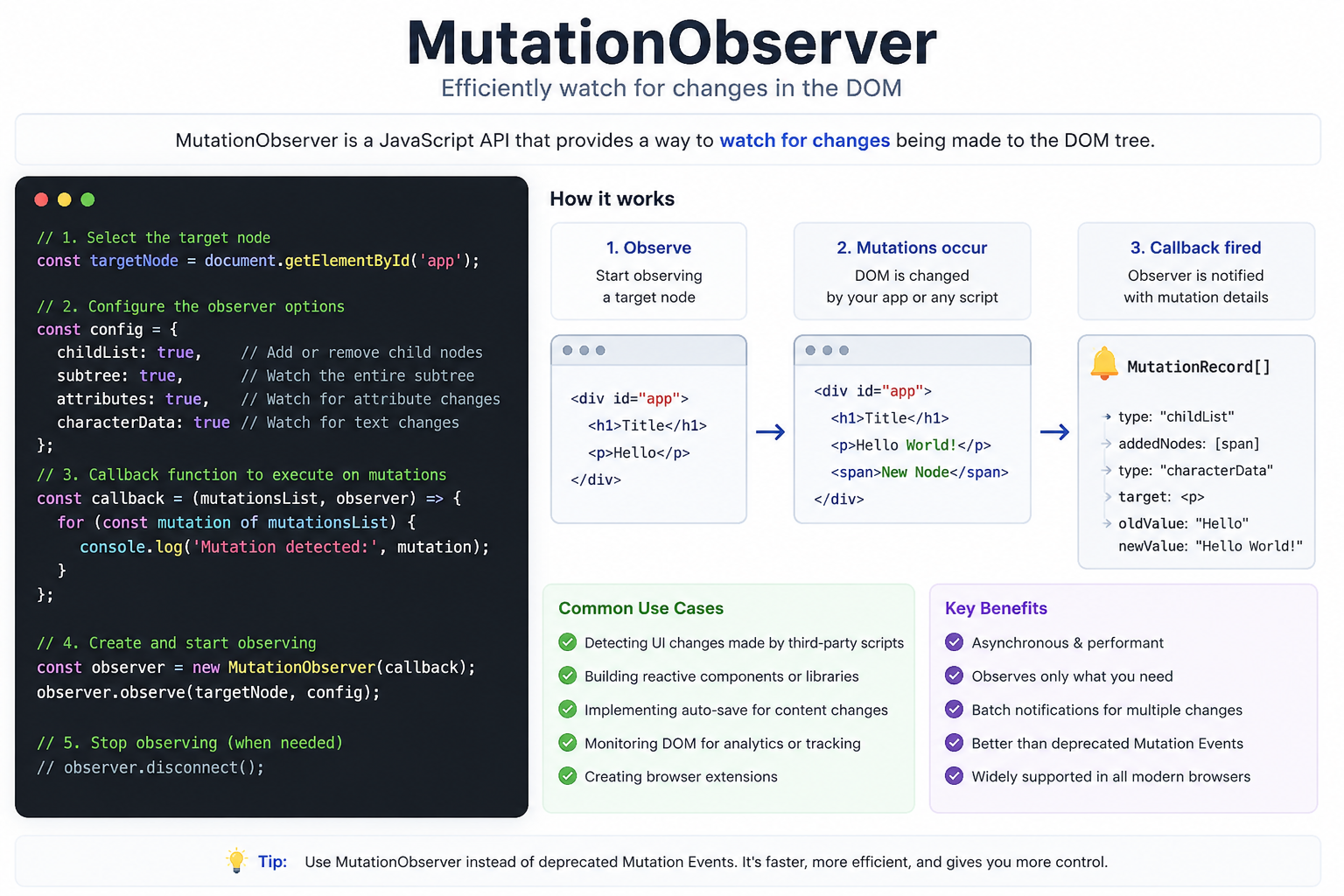
MutationObserver is a browser API that watches an HTML element for changes. It can detect added or removed elements, attribute updates, and changes to text content. Unlike continuous polling, an observer runs only when a relevant mutation occurs, making it a practical option for conversion experiments and personalization.
Basic MutationObserver Example
The following example watches a product container and marks newly added products as observed:
const container = document.querySelector('.product-grid'); const observer = new MutationObserver((mutations) => { mutations.forEach((mutation) => { mutation.addedNodes.forEach((node) => { if (node.nodeType === 1) { node.setAttribute('data-observed', 'true'); } }); }); }); observer.observe(container, { childList: true, subtree: true });
Always confirm that the target element exists before observing it. You should also call observer.disconnect() when monitoring is no longer required.
Practical Ecommerce Examples
Personalize Dynamic Product Pages
A product page may load inventory, prices, or recommendations asynchronously. MutationObserver can detect when the final content appears, allowing an approved experience to update a headline, benefit statement, or call to action at the correct moment.
Respond to Cart Updates
When an item is added to a mini-cart, an observer can identify the new cart state. The storefront can then display an audience-appropriate shipping message or complementary offer. Avoid changing core purchase information in ways that could surprise customers.
Test Single-Page Applications
Traditional scripts may execute only during the first page load. MutationObserver can detect route-driven DOM changes so experiment logic is applied when the relevant component becomes available.
How to Use It Safely
- Observe the smallest relevant container. Watching the entire document can create unnecessary work.
- Filter mutations. Process only the nodes or attributes required by the experience.
- Prevent repeated changes. Add a data attribute after applying a variation so your own DOM update does not create a loop.
- Test across devices. Dynamic components may render differently on mobile and desktop.
- Measure business outcomes. Track conversions and revenue, not only clicks.
Move Beyond Manual DOM Scripts
MutationObserver provides useful technical plumbing, but it does not decide which visitor should receive a variation or whether that variation improves performance. Growth teams also need audience rules, controlled experiment allocation, and reliable measurement.
PRZIO A/B Testing and Personalization helps teams deliver audience-based page variants and run clean tests. Combine it with the Audience Manager to coordinate segments across experiences, and use the Website Tracker to evaluate event-level activity. This makes AI-informed test ideas and personalized experiences easier to manage than maintaining disconnected scripts for every campaign.
Frequently Asked Questions
Does MutationObserver replace A/B testing software?
No. It detects DOM changes, but it does not provide audience management, experiment governance, or conversion analysis.
Can an observer affect performance?
Yes, if it watches a broad container or performs expensive work after every mutation. Narrow the target, filter results, and disconnect unused observers.
Can it be used for personalization?
Yes. It can identify when dynamic content is ready, while PRZIO controls the intended audience, variation, and measurement strategy.
Build Better Personalized Experiences
Want to integrate this into your storefront or website? PRZIO helps you ship hosting, personalization, campaigns, and recommendations from one platform. Explore personalized A/B testing or book a PRZIO demo to discuss your implementation.