
Challenge
Airline customers often see the same seat-selection experience regardless of their previous bookings, travel habits, or loyalty membership. A frequent business traveler who regularly books an aisle seat near the front receives the same generic seat map as a first-time leisure traveler. This creates unnecessary friction and misses an opportunity to increase paid seat selection, cabin upgrades, and loyalty engagement.
The customer data needed to improve this experience may also be fragmented. An anonymous visitor can browse a route before signing in, book with an email address, and later return through a loyalty account. If these interactions remain separate, the airline cannot reliably use the customer's last seat booking or membership tier in website and email personalization.
Approach
Create a unified audience profile that connects anonymous browsing, booking activity, email identity, and loyalty membership to one PRZIO audience UUID. Use that profile to recommend relevant available seats during booking and send personalized follow-up emails when the traveler leaves without selecting a seat.
1. Define the seat and loyalty data
Start with a focused set of profile fields and events. Useful attributes include loyalty tier, points balance range, preferred cabin, home airport, typical trip type, and the seat selected on the most recent completed booking. Track events such as flight searched, itinerary selected, seat map viewed, seat selected, seat offer declined, booking completed, and email clicked.
Send these attributes and events to PRZIO Audience Manager. Avoid storing unnecessary sensitive information. PRZIO needs actionable preference and behavioral fields, while the airline's reservation platform should remain the system of record for passenger and ticket data.
2. Stitch email and loyalty identity
Assign an anonymous PRZIO audience UUID when a visitor begins browsing. When the visitor signs in, enters an email during checkout, or follows an authenticated email link, associate the verified email and loyalty membership identifier with that UUID. If the same customer returns on another recognized channel, merge the activity according to the airline's identity rules.
Use deterministic matches for verified email addresses and authenticated loyalty accounts. Do not merge profiles solely because two travelers share a device or similar behavior. Define conflict rules before launch, including which source controls loyalty tier, how changed email addresses are handled, and when profiles should remain separate.
3. Rank relevant available seats
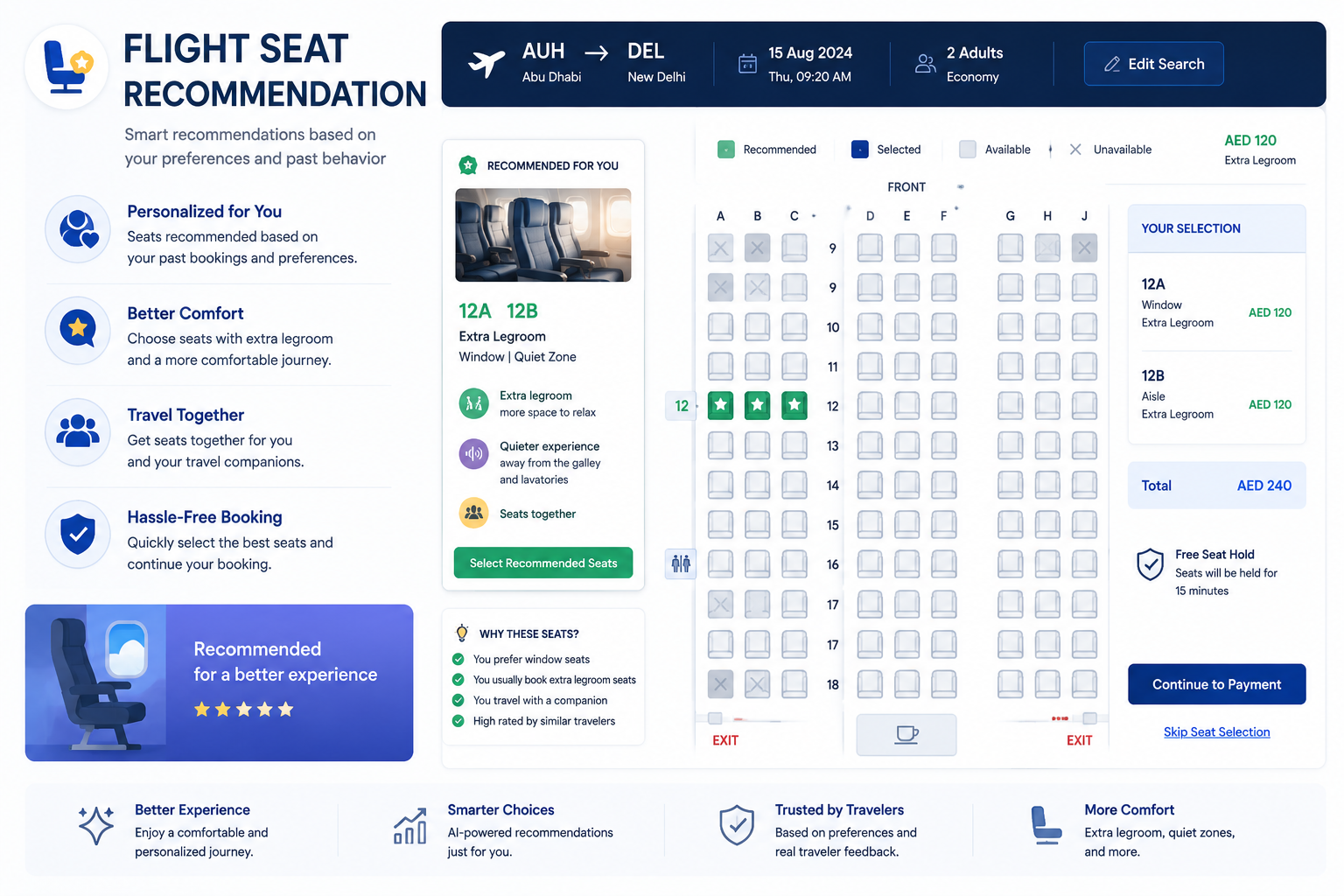
Connect current seat availability and seat attributes to PRZIO Product Recommendations. Treat each eligible seat or seat category as a recommendation candidate. The ranking can consider the customer's last booked seat, repeated preference patterns, loyalty tier benefits, aircraft layout, party size, price, and current availability.
For example, a Gold member who booked aisle seats in the first five rows on recent trips could first see available front-cabin aisle seats, followed by extra-legroom aisle options. A family booking could prioritize adjacent seats instead. Recommendations should never display an unavailable seat or imply that a paid benefit is complimentary. Availability, entitlement, accessibility, safety, and operational rules must override personalization.
4. Connect the audience to email
Create segments for travelers who completed a booking but did not select a seat, viewed a premium seat without purchasing, or qualify for a loyalty benefit they have not used. Activate those audiences through PRZIO Email Editor and Campaigns.
A practical sequence could send the first reminder shortly after booking, a second message when preferred inventory becomes limited, and a final operationally appropriate reminder before check-in. Personalize the message with the route, departure window, loyalty benefit, and recommended seat category. Link customers back to an authenticated seat-selection page rather than exposing booking details in the email.
How PRZIO helps
Results and next steps
Measure paid seat-selection rate, recommendation click-through rate, upgrade revenue per booking, email conversion, and time required to complete seat selection. Break results down by loyalty tier, route type, device, and recommendation strategy. Also monitor negative signals such as recommendation dismissals, support contacts, unsubscribe rates, and cases where suggested seats become unavailable.
Begin with one aircraft family or route group and two or three transparent rules. Run a controlled test, validate identity-stitching accuracy, and confirm that all seat recommendations respect inventory and loyalty entitlements. Once the play produces reliable lift, expand to cabin upgrades, ancillary bundles, and loyalty-point redemption offers.
Ready to build the play? Explore PRZIO Product Recommendations and book a PRZIO demo to plan the audience, inventory, and email integration.
What users ask
Common questions teams ask before shipping this play.
How is a traveler's email connected to the PRZIO audience UUID?
Create the UUID during anonymous browsing, then associate it with a verified email or authenticated loyalty account during sign-in, checkout, or a secure email-link session.
Does PRZIO replace the airline reservation or loyalty system?
No. Those platforms remain the systems of record. PRZIO uses approved profile attributes, events, eligibility rules, and availability inputs for personalization.
What happens if the customer's previous seat is unavailable?
The ranking should select the closest eligible alternative based on seat position, type, cabin, price, benefits, and current inventory.
Can recommendations account for loyalty benefits?
Yes. Membership tier and eligible benefits can influence ranking and messaging, but entitlement rules must be supplied and enforced accurately.
How should the airline test this play?
Start with a limited route or aircraft cohort and compare personalized recommendations with the existing seat-selection experience using conversion, revenue, and customer-friction metrics.
When should seat-selection emails be suppressed?
Suppress messages after a seat is selected, a booking is canceled or changed materially, the traveler opts out, or the seat-selection window closes.